
Robux Tax Calculator – Calculate Roblox 30% Fee Instantly
Instantly calculate your Roblox marketplace earnings
⚠️ Default Tax Rate: 30%💎 What Is the Robux Tax Calculator?
The Robux Tax Calculator is a free browser-based tool built by the team behind Fluxus Executor — one of the most trusted Roblox script executors in the community. It helps creators and players instantly calculate exactly how many Robux they will receive — or must list — after the platform’s standard 30% marketplace fee is applied. No sign-up, no downloads, and no math required.
Whether you’re a developer pricing a new game pass, a UGC creator listing an avatar accessory, or simply a player trying to understand what the seller actually earns from your purchase, this calculator gives you a precise, real-time breakdown in seconds.
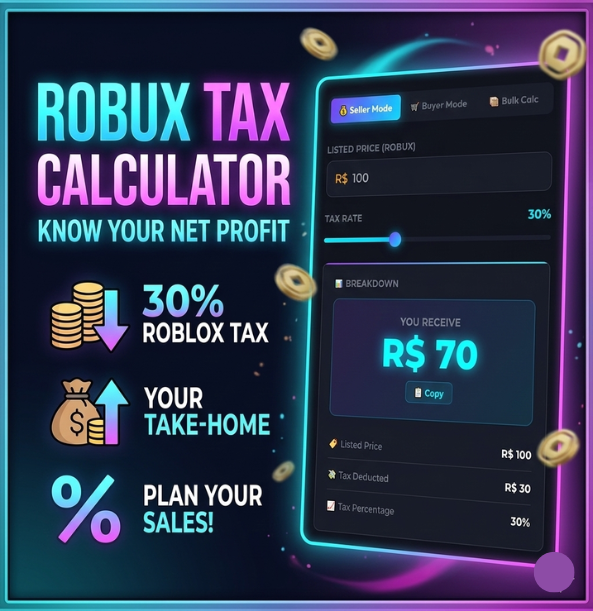
Three Powerful Modes
- Seller Mode – Enter your listed price and see the exact Robux deposited into your account after the 30% cut. Includes a Reverse Calculator so you can work backwards from a target earnings amount.
- Buyer Mode – Enter your budget and see how much of it actually reaches the seller versus going to Roblox’s fee.
- Bulk Calculator – Perfect for developers selling multiple items or game passes. Enter a price and quantity to see gross revenue, total fees, and net earnings per item.
⚡ How to Use the Robux Tax Calculator
Seller Mode (most common)
- Select the 💰 Seller Mode tab at the top of the calculator.
- Type your intended listing price in the Listed Price field (e.g.
1000). - The tax rate slider defaults to 30% — leave it there for standard Roblox fees, or adjust it if you’re calculating for a different platform or future rate change.
- Results update instantly as you type: you’ll see the tax deducted, the Robux you receive, and a visual progress bar showing your keep ratio.
- Use the Reverse Calculator box below to flip the calculation — enter how much you want to receive and get the exact price you need to list at.
Quick Formula
Robux You Receive = Listed Price × (1 − Tax Rate)
Example: R$1,000 × 0.70 = R$700
Listing Price Needed = Desired Earning ÷ (1 − Tax Rate)
Example: R$700 ÷ 0.70 = R$1,000
Bulk Mode
If you have a game pass or UGC item selling at high volume, switch to 📦 Bulk Calc. Enter the per-item price and total quantity to see your complete revenue picture: gross earnings, total fees paid to Roblox, net Robux, and per-item take-home.
❓ Why Does Roblox Take 30% Tax?
Roblox’s 30% marketplace fee — often called the “Roblox tax” by the community — is a platform commission charged on all peer-to-peer transactions on the Roblox marketplace. Here’s why it exists and what it pays for:
1. Platform Infrastructure & Hosting
Roblox runs millions of game servers 24/7 across the globe. The marketplace fee helps cover the enormous cost of game hosting, CDN delivery, asset storage, and the compute power needed to run thousands of concurrent experiences simultaneously.
2. Payment Processing
Every time a player converts real money into Robux, Roblox pays credit card processors, mobile app stores (Apple App Store and Google Play each take up to 30% themselves), and banking fees. A portion of the marketplace fee offsets these transaction costs.
3. Safety & Moderation
Roblox employs thousands of human moderators and invests heavily in AI-based safety systems to protect its young user base. Reviewing UGC items, detecting fraud, and combating exploit scripts are continuous, costly operations funded in part by marketplace revenue.
4. Developer Exchange (DevEx) Programme
Roblox lets qualifying creators convert Robux to real USD through DevEx. Maintaining a liquid exchange requires Roblox to hold reserves of real currency, and the platform commission contributes to sustaining this programme.
5. Roblox Platform Revenue
Like all app marketplaces (Steam takes 30%, Apple App Store takes 15–30%, Epic Games Store takes 12%), Roblox charges a commission to run a sustainable business. The fee has been 30% since the early days of the platform and applies uniformly to all creators regardless of earnings tier.
Platform | Standard Fee | Creator Keeps |
|---|---|---|
Roblox Marketplace | 30% | 70% |
Steam | 30% | 70% |
Apple App Store | 15-30% | 70%-85% |
Google Play | 15-30% | 70–85% |
💡 Pricing Tips for Roblox Creators
Getting your pricing right is key to maximising your Robux earnings. Here are the most important strategies experienced Roblox developers use:
Use the Reverse Calculator
Always start with how much you want to earn, then work backwards to your listing price. Avoid psychological round-number traps like listing at R$100 when you need R$70.
Think in Bulk
A lower-priced item with high volume often beats a single expensive item. Use the Bulk Calculator to model different volume-pricing scenarios before you publish.
Price at 70-Friendly Numbers
Set your listing price so that 70% of it equals a round number. E.g. R$1,000 → you receive R$700. This keeps your accounting clean and easy to track.
Factor in DevEx Rate
If your goal is USD income, calculate net Robux first, then apply the current DevEx rate (~$0.0035/R$) to estimate your real-world earnings before withdrawing.
Review Pricing Regularly
Roblox may adjust fee structures or DevEx rates over time. Use our custom tax-rate slider to model future scenarios and adapt your pricing strategy in advance.
Track with History
Use the calculator’s built-in history panel to compare different pricing scenarios side by side before committing to a final listing price.
💎 What Is the Robux Tax Calculator?
Use this table as a quick cheat sheet for common listing prices and their after-tax values at the standard 30% rate.
Listed Price (R$) | Roblox Takes (30%) | You Receive (70%) |
|---|---|---|
25 | 8 | 17 |
50 | 15 | 35 |
100 | 30 | 70 |
250 | 75 | 175 |
500 | 150 | 350 |
1,000 | 300 | 700 |
2,500 | 750 | 1,750 |
5,000 | 1,500 | 3,500 |
10,000 | 3,000 | 7,000 |
50,000 | 15,000 | 35,000 |
100,000 | 30,000 | 70,000 |